
Customer Database
The customer database is filled in automatically as the loyalty program is used. The digitized database enables customer analysis and segmentation, and exporting to Excel takes just one click.
What it offers your business
Automatic collection
Every new customer enters the database at their first purchase — no manual entry or paper forms.
Customer profile
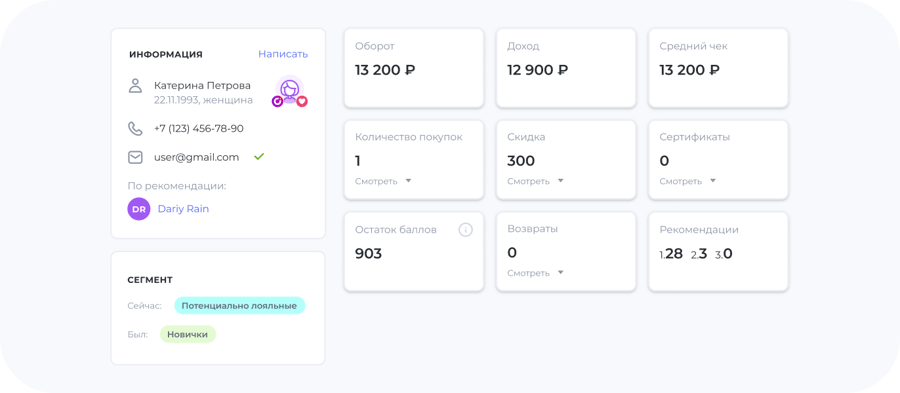
Purchase history, average ticket, points balance and contact details — all in a single record.
Analysis and export
Segment customers by activity and export the database to Excel for campaigns and reports.
Customer photos in your database
If a customer has uploaded a profile photo in the app, their avatar appears in your customer database — you'll recognize a regular guest by sight.
Customize the database for yourself
In the UDS Business mobile app, in the "Customers" section you can enable exactly the fields you need — the database is displayed the way that's convenient for you.
You can also see guests marked as "excluded from statistics" there: they aren't counted in reports, but they don't disappear from the database.
Customer card — right on your phone
In the UDS Business Mobile app, each customer has a detailed page with statistics about them. From there you can also manually add or deduct points and issue a certificate — without going to the computer.