
Loyalty Program
The UDS loyalty program is your ready-to-use bonus system: customers earn and spend points, return more often, and recommend you to friends.
What it offers your business
Bonus points
Customers earn points for purchases and use them to pay for part of their future orders.
Customer retention
Accumulated points bring the customer back to you, not to the competition.
Word-of-mouth marketing
Built-in referrals bring new customers on the recommendation of satisfied clients.
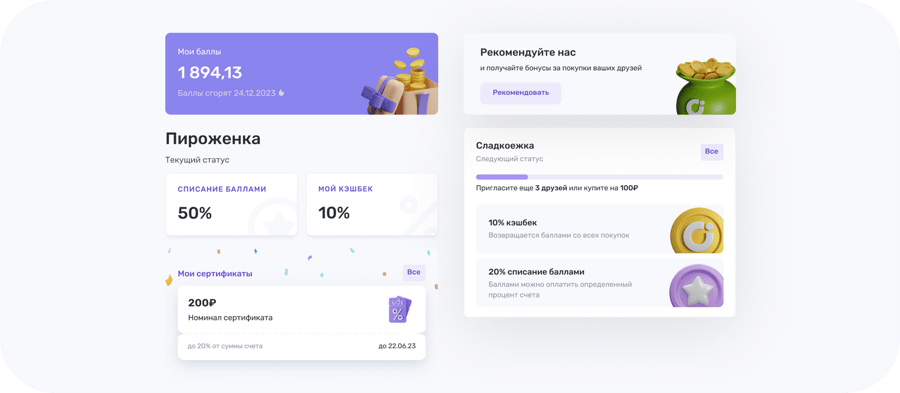
Hidden loyalty status
Besides the regular bonus program statuses, you can set up a hidden status: it isn't visible among the company's general statuses, and you assign it to guests manually.
This lets you offer special terms to individual customers without announcing it to everyone.
Setup: UDS Business → "Settings" → "Loyalty Program" → add "hidden status".
Delayed points
Points for a purchase can be credited to the customer not right away, but after a set number of days. That way they won't spend them on the same receipt, but will come back for them later.
Setup: UDS Business web version → "Loyalty Program" → "Special Conditions" → check "Set a period for crediting points for purchases" → choose the number of days → "Save".
Customers see their delayed points right in the app.
Statuses visible to the customer on one page
In the app, all your company's statuses are shown on one shared page: for each — the cashback percentage on purchases, the percentage that can be paid with points, and the conditions to reach that status.
The customer doesn't need to search for anything: they instantly compare the tiers and see what's needed to reach the next one.
When the customer can spend their welcome points
In the loyalty program settings, next to the number of welcome points, there's an option: the customer can use them right after joining the company, or only after their first purchase.
The second option filters out those who came only for the gift: the customer still receives the points, but can only spend them after buying something. On your company's page they'll see a block showing the amount of points waiting for them after their first purchase.
Each certificate has its own redemption percentage
When creating a new certificate in the UDS Business web version, you set the "Points redemption limit" yourself — from 1% to 100%. One certificate can cover the entire receipt amount, another — only part of it. This setting applies to new certificates; if cashiers use UDS Cashier, the app needs to be updated.