
Employee Activity Reports
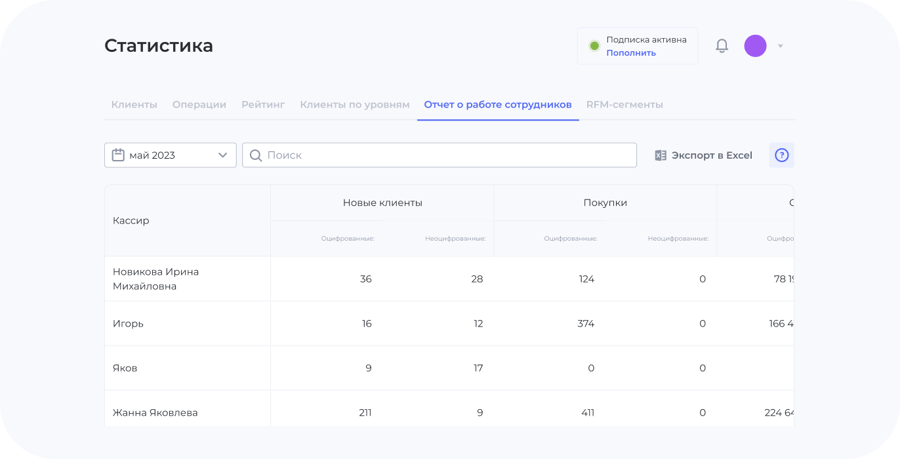
Employee activity reports show who accrued and redeemed points, attracted customers and made sales, and how much — an objective picture of each person's performance.
What it gives your business
Each person's contribution
You can see exactly what every employee did per shift, day or month.
Sales and accruals
All point operations and sales are linked to a specific employee.
Transparent KPIs
Objective figures help you evaluate and reward the team fairly.
UDS Implementation Efficiency
This feature shows when it's time to tighten control over how employees work with the loyalty program.
Setup: UDS Business → "System Settings" → enter the average number of sales per day → then you receive daily statistics on implementation efficiency.
Action History: who did what in the dashboard
Besides sales figures, UDS keeps a log of your employees' and managers' actions. In the UDS Business web version, open the "Security" section → "Action History" tab — and you'll see who awarded and redeemed points, changed a customer's status, sent out certificates, edited loyalty program settings, deleted operations, blocked customers, exported customers and operations to Excel.
You won't have to guess in a disputed situation: it's clear exactly who did what and when.
The Report Can Be Downloaded in Excel
The employee performance report is exported from the UDS Business web version as an .xlsx file. Save it monthly — and you'll be able to compare months against each other.
The same file is handy to show employees themselves when discussing bonuses: everyone sees the same numbers.